
Weapons and Equipment
Chrome Vanguard: Forging Example and Skill Guide
Last updated:
Find The Apex and Panic-Core, follow a successful Chrome Vanguard forging example, and learn how to equip its Katana form and aim its forward-area skill.
In Forge > Weapon, The Apex ×3 plus Panic-Core ×1 is a successful Chrome Vanguard forging example. The final preview showed Katana 100% and Multiplier 137; that percentage guarantees the category, not the named weapon.
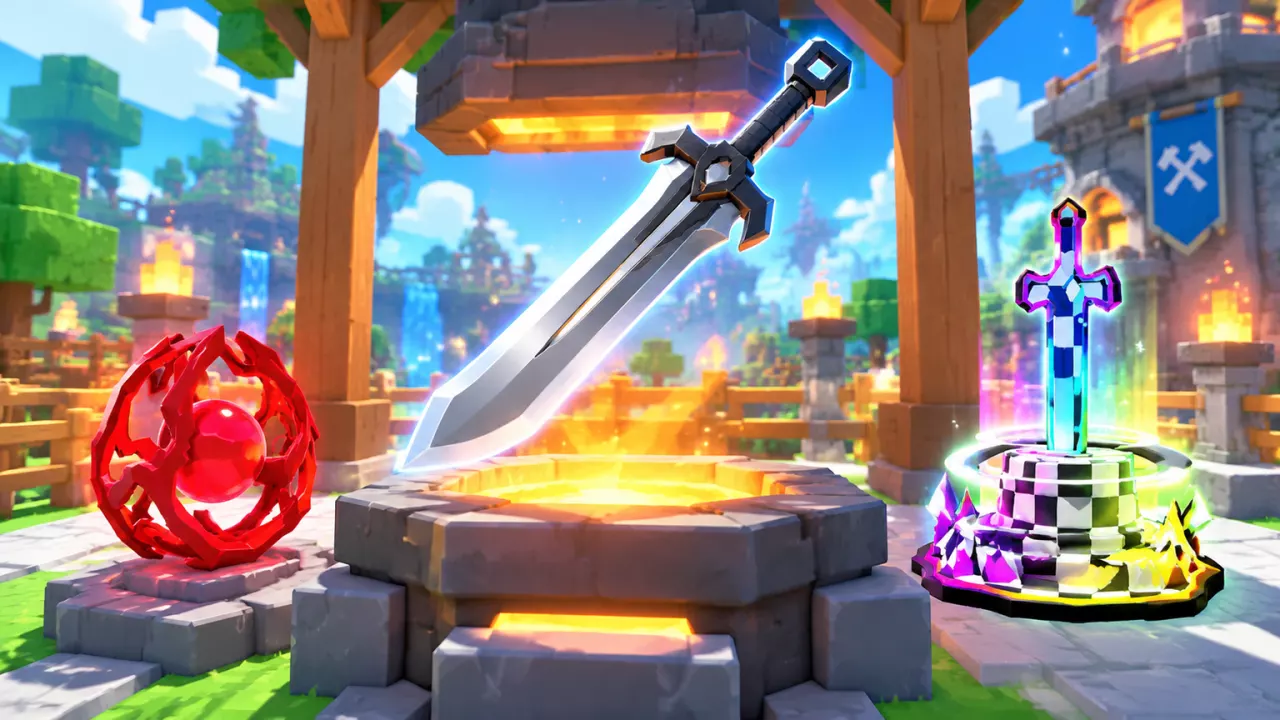
Chrome Vanguard is an Ancient Katana despite its broad blade. Compare its current Power and attached skill with your equipped weapon before switching.

Inspect Chrome Vanguard's conditional forged attributes and forward-area skill alongside a known forging example.
Chrome Vanguard
- Appearance
- Gray broad-bladed sword (Weapon Index entry)
- Class
- Katana (Forge result card)
- Rarity
- Ancient (Forge result card)
- Power
- 400000000 (Displayed as +400M on the result card after forging in Weapon mode with The Apex ×3 and Panic-Core ×1)
- Item card price
- 55000000 Coins (Displayed as 55M on the Forge result card; not the forging cost)
- Skill damage per enemy
- 470 % (Deals damage to each enemy in an area in front)
- Skill cooldown
- 7 seconds (Weapon skill)
- Successful forging example
- The Apex ×3 + Panic-Core ×1 (Weapon mode; the preview showed Katana 100% and Multiplier 137, and this attempt produced Chrome Vanguard. The percentage applies to the weapon category, not a guaranteed named weapon; do not treat this combination as the only recipe.)
Identify Chrome Vanguard
Chrome Vanguard has a broad silver-gray blade and a black handle, but its formal Class is Katana. Use the Class field when comparing weapons rather than treating its wide blade as a Greatsword.
The +400M Power value belongs to the Chrome Vanguard produced by the forging example below. Check your own copy in Backpack when deciding what to equip. The 55M Coins Price is the finished item's card value, not a fee required to perform that forge. For other equipment choices, use Weapons, Power, and Skills.
Find The Apex and Panic-Core
Gather The Apex ×3 and Panic-Core ×1 for the forging example. These materials can appear after Dungeon combat:
| Material | Where to look | Recommended Power at the entrance |
|---|---|---|
| Panic-Core | After defeating Snow Golem King in Stage 22 | 1 Qi Power |
| The Apex | After combat in Stage 24 | 5 Qi Power |
| The Apex | After combat in Stage 26 | 22 Qi Power |
The entrance values are recommendations, not mandatory entry requirements. If you can consistently clear Stage 24, repeat that stage to gather The Apex. These drops are possible rewards rather than guaranteed materials from every clear.
- Keep an empty ore bag slot before collecting a drop.
- Approach the material and press E when Collect appears. The Apex resembles a rainbow-outlined sword on a checkerboard base; Panic-Core is a red core within an open ring.
- Return to the hub and check Backpack > Ore or the Forge material list for the quantities you need.
When fighting Snow Golem King, move out of the red ground circles before its ice spikes land. See Dungeon stages and bosses for progression help and ore collection for material and carrying details.
Follow the Forging Example
- Approach the Forge in the main plaza and press E at the Forge prompt.
- Select Weapon.
- Add The Apex until its material slot shows ×3, then add Panic-Core to a second slot so it shows ×1. Leave the other two slots empty.
- Check the final selection: Katana: 100%, Multiplier: 137, and an active yellow Forge button.
- Press Forge, wait for the result card, and read the finished item's name. Follow the card's prompt to continue, then inspect the item in Backpack.
This combination has produced Chrome Vanguard. Katana 100% locks the weapon category, but it does not guarantee Chrome Vanguard or a particular attached skill, and you should not treat this combination as an exclusive recipe.
Forging requires at least four ore pieces, with up to four ore types; multiple pieces of one type stack in a single slot. A Multiplier reading alone does not mean the selection is ready to forge. For broader material adjustments and preview rules, see How to Forge Weapons and Armor.
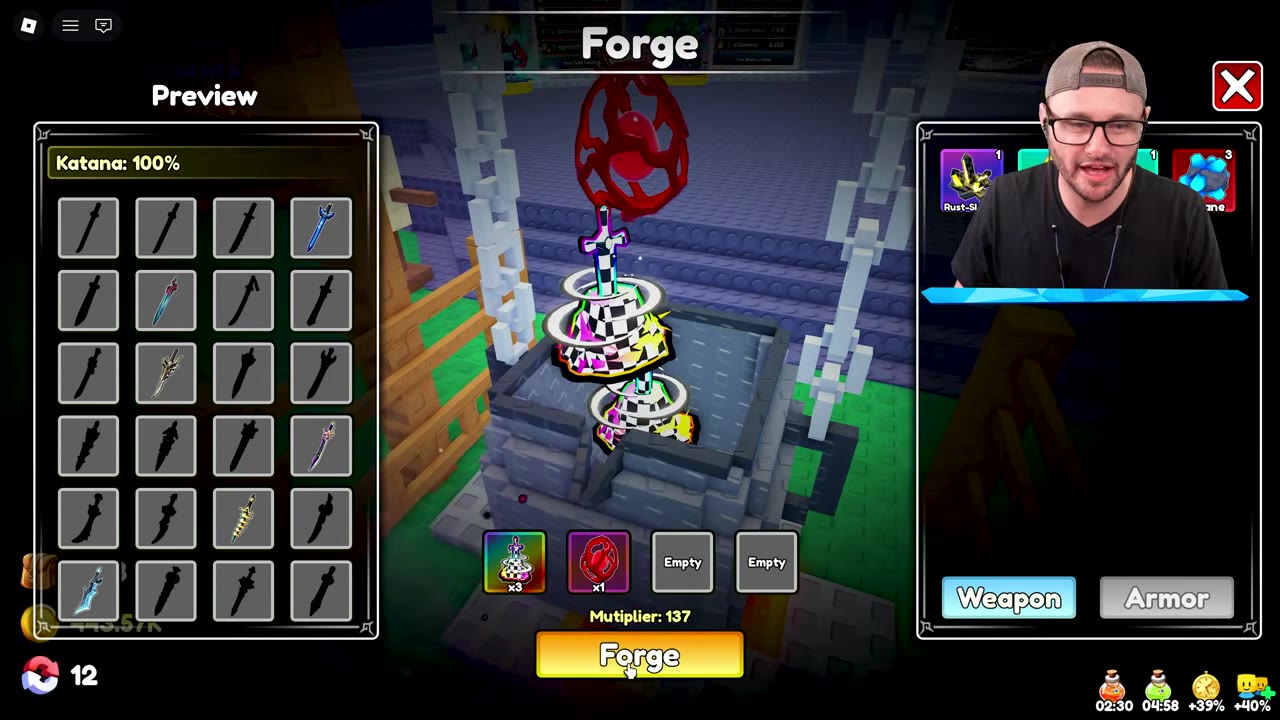
 Forge Chrome Vanguard with The Apex and Panic-Core▶ Watch demonstration
Equip It and Aim the Forward-Area Skill
- Open Backpack > Weapon and select Chrome Vanguard.
- Compare its displayed Power with your current weapon, then inspect its skill icon and description. Copies of the same named weapon can carry different skills.
- Click Equip if you want to use it. Confirm the change through the green equipment mark, weapon equipment slot, or UnEquip button; receiving a forged item is separate from equipping it.
- In combat, face the enemies you want to hit. When the main skill on Q is ready, press Q, then watch its cooldown before casting again.
The forward-area skill listed for this Chrome Vanguard deals 470% damage to each enemy in range ahead and has a 7-second cooldown. Use it when enemies are grouped in front of you. The percentage applies to each affected enemy; it is not a damage total divided among the group.
Check the skill on your own copy before relying on those values. For Q/E controls and the separate extra skill slot, see Combat Skills and the Second Skill Slot.