
Weapons and Equipment
Infernal Overlord: Forging Example and Skill Guide
Last updated:
Find The Apex in Dungeon Stages 24 and 26, follow a 13-ore Infernal Overlord forging example, and learn how to equip and use its SS dash skill.
Collect The Apex after combat in Stage 24 or 26, then use the plaza Forge in Weapon mode. A 13-piece The Apex selection showed Greatsword 100% and Multiplier 140 and produced Infernal Overlord. Equip the finished weapon from Backpack; a copy with the SS dash-and-explosion skill uses Q.

Infernal Overlord is an Infinite Greatsword made from ore at the Forge. The Apex has known drops in Dungeon Stages 24 and 26, and one successful forge used 13 pieces of it.
Inspect Infernal Overlord and understand its forging example and dash-and-explosion skill.
Infernal Overlord
- Class
- Greatsword
- Rarity
- Infinite
- Power
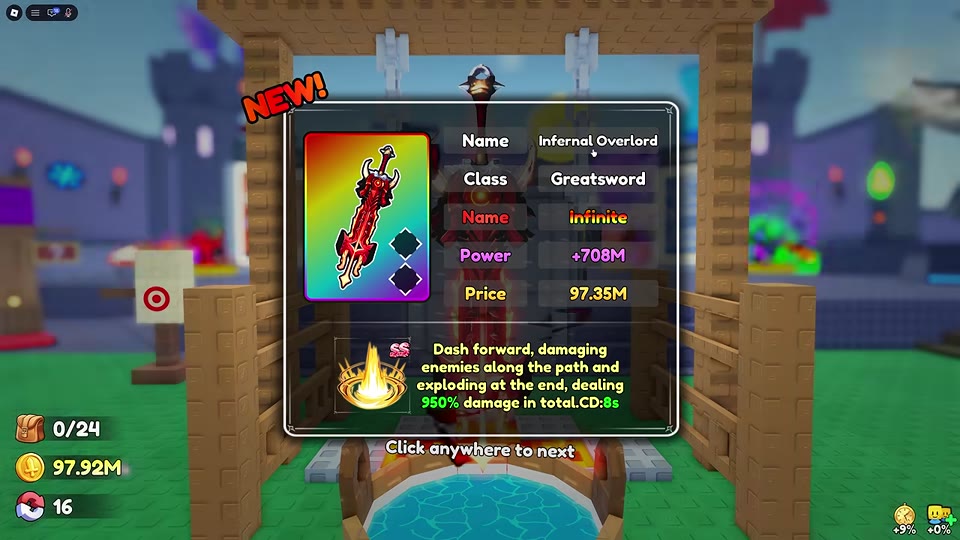
- 708000000 Power
- Item-card price
- 97350000 Coins
- Appearance
- Broad red-and-black greatsword with glowing orange-yellow markings
- Skill damage
- 950 % (SS skill: forward dash damaging enemies along the path and exploding at the endpoint; total damage)
- Skill cooldown
- 8 seconds (SS skill: forward dash damaging enemies along the path and exploding at the endpoint)
- Skill key
- Q (While equipped)
- Forging example
- The Apex ×13 as the only material; Multiplier 140; Greatsword preview 100%; yielded Infernal Overlord with the SS dash-and-explosion skill. (Successful Weapon-mode forge; the preview percentage applies to the weapon category and does not guarantee this named weapon or skill.)
Identify Infernal Overlord
Infernal Overlord is a broad red-and-black Greatsword with glowing orange-yellow markings. Compare the Power and skill shown on your own Backpack card when choosing between weapons; copies with the same name can carry different skills. The Coin Price on an item card is its displayed value, not a forging cost. For other weapon choices, see Weapons, Power, and Skills.
Collect The Apex
The Apex can drop after combat in Dungeon Stage 24 or Stage 26. If you can clear Stage 24 consistently, it is a practical place to make repeat runs. The Apex is not guaranteed on every clear.
- Leave room in your ore bag and fight through a stage where The Apex can appear.
- Check the ground after combat. Approach a drop and press E when Collect appears.
- Return to the hub and check Backpack > Ore for the material.
See Dungeon Stages, Bosses, and Golden Goblin for stage progression and Ores and How to Collect Them for ore pickup and carrying details.

Forge with 13 The Apex
One successful setup used The Apex ×13 as its only material. In Weapon mode, the preview showed Greatsword 100% and Multiplier 140; the finished weapon was Infernal Overlord with the SS dash-and-explosion skill. The 100% applies to the Greatsword category, not to Infernal Overlord or a particular skill.
- At the main plaza Forge, press E when Forge appears and select Weapon.
- Add 13 The Apex to one material slot. Leave the other three material slots empty.
- Read the current category preview and Multiplier, then press Forge when the button is active.
- Continue past the result card and open Backpack > Weapon to inspect the finished item.
Changing the amount or mix of ore can change the category preview. For the full material and preview controls, see How to Forge Weapons and Armor.
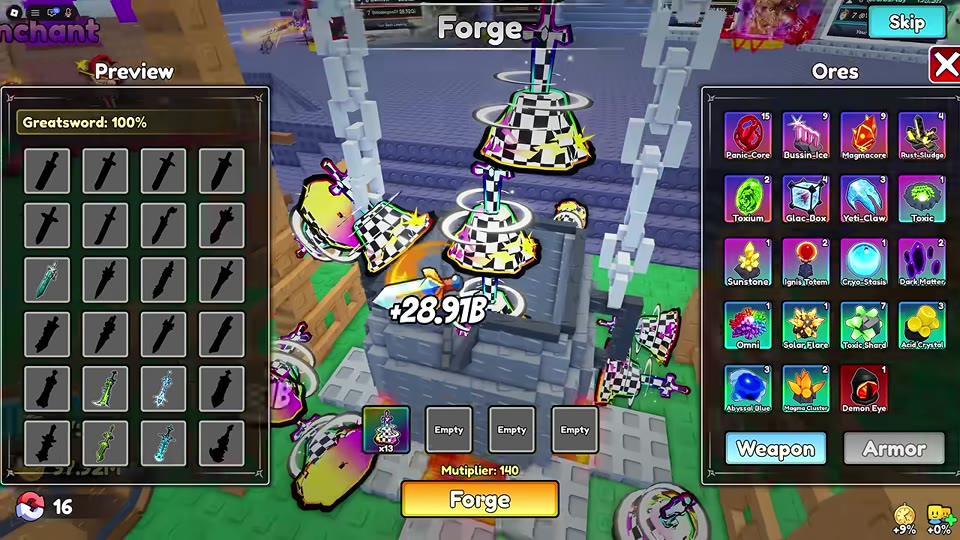
 Forge Infernal Overlord with 13 The Apex▶ Watch demonstration
Equip and use the SS dash skill
Forging places the weapon in Backpack; it does not equip it. Open Backpack > Weapon, select Infernal Overlord, press Equip, and confirm that its card has the green equipped mark.
If that copy has the SS dash-and-explosion skill, press Q while it is equipped. The attack dashes forward, damages enemies along its path, and explodes at the endpoint. Its card lists 950% total damage and an 8-second cooldown. Aim the dash through enemies or toward a group, then watch the Q hotbar indicator for the next available use. See Combat Skills and the Second Skill Slot for combat shortcuts and skill slots.
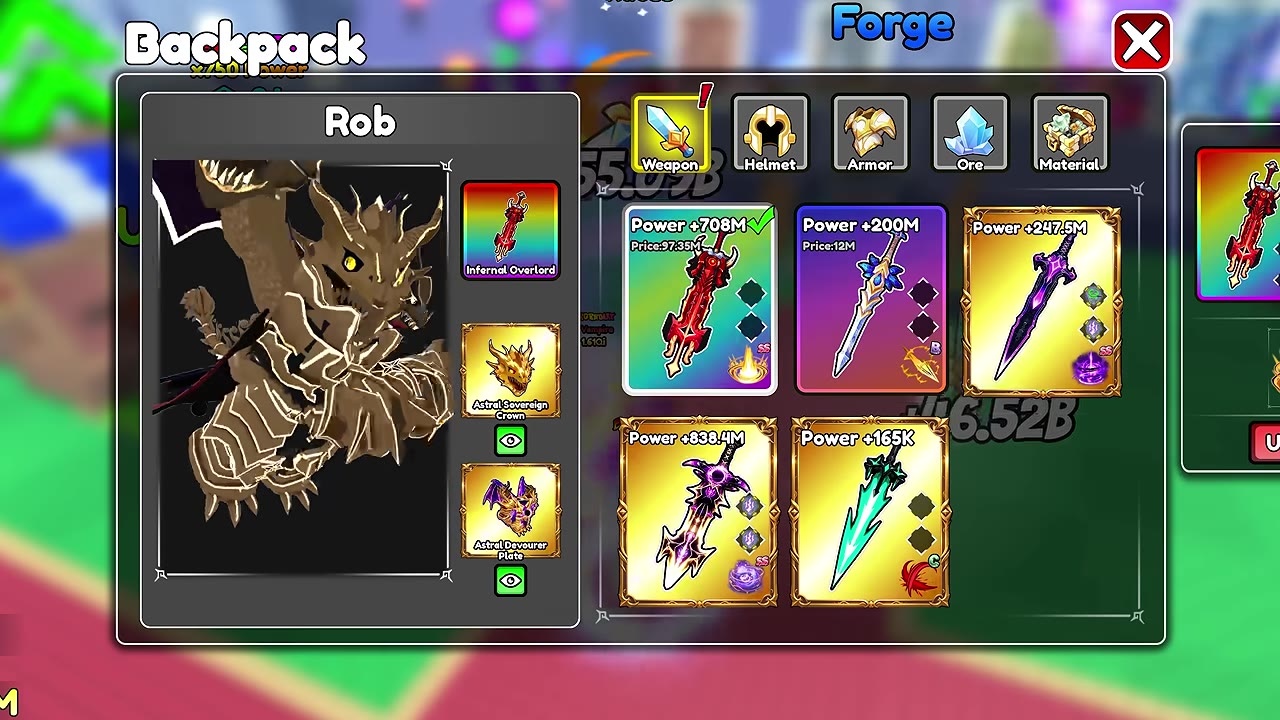
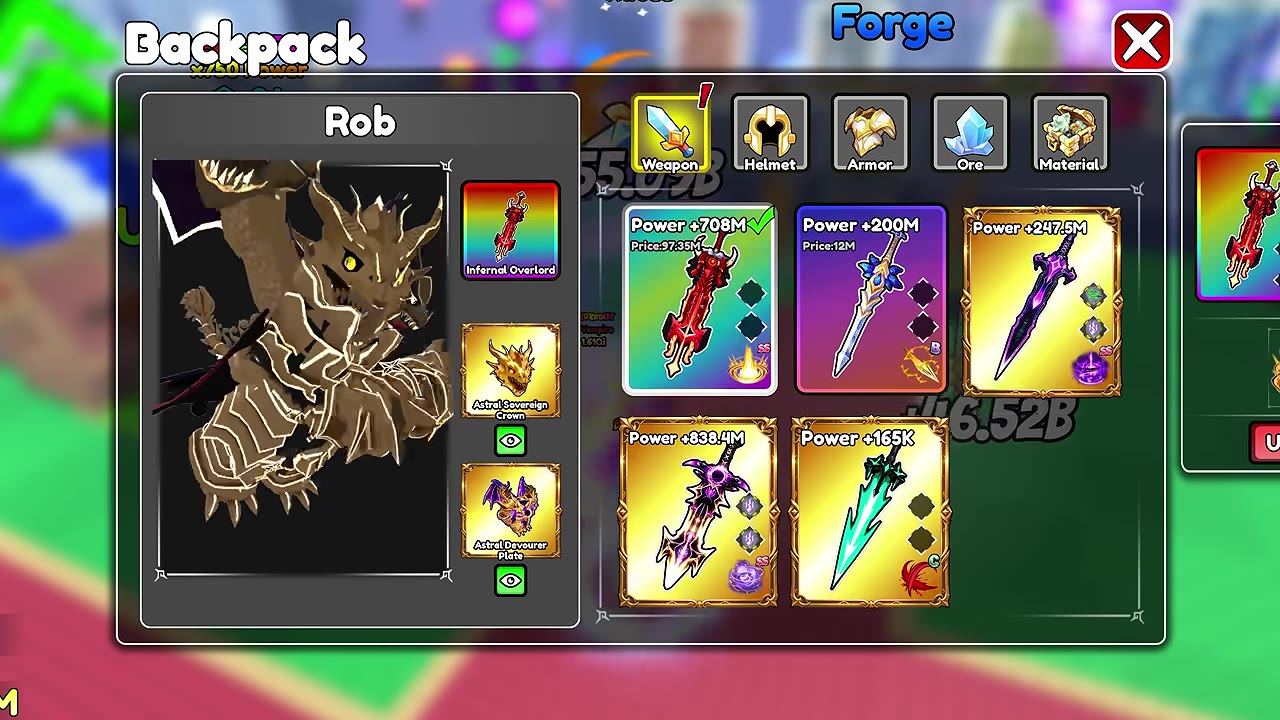 Equip Infernal Overlord and use its Q skill