Races, Rerolls, and Star Perks
Last updated:
Learn how to spend Race Rolls, keep race star progress, unlock Race Perks slots, and compare active bonuses for training, combat, and luck.

Quick answer
Select the slot you want to change and press Reroll; each press costs one Race Roll. Repeated draws can raise that race’s stars while a higher star level is available, and its progress remains if another race replaces it. Choose by confirmed active perks, treating next-star values as previews; do not assume either side of Angel’s arrows shows active perks.
Races grant perks that change as their star levels rise. The Races menu lets you spend Race Rolls, inspect the current bonuses, and switch between races held in Race Perks slots.
On this page
Compare race perks by star level for a chosen build, keeping current bonuses separate from next-star previews.
9 objects
Select objects to compare their properties.
Reroll a Race and Get More Rolls
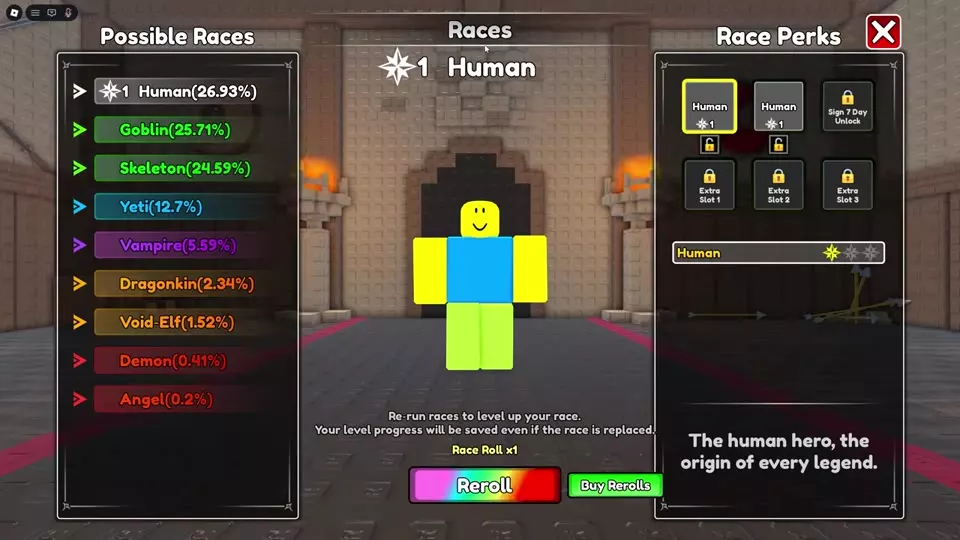
- Open Races from the main interface. Check your Race Roll count and the Possible Races odds.
- Select the Race Perks slot you want to change, then press Reroll. One Race Roll is spent, and the selected slot shows the result.
- Read the result’s star level and active perks before rolling again. To use a race held in another slot, select that slot in Race Perks.
When you have no Race Rolls, check the Online panel for a claimable Race Roll ×1 reward; Online rewards explains its claim status. Buy Rerolls also offers packs. Check the purchase popup before confirming, since its price can differ from the menu price.
Open Update Logs and select Update 4.2. If its Race Roll ×2 reward is available, claim it; Claimed means it has been collected. Purchasing Astral Genesis: The Tri-Wyrm Set includes 25 bonus Race Rolls; see Shop Boosts, Potions, and Bundles for the bundle.
| Race Rolls | Buy Rerolls menu | Purchase popup shown |
|---|---|---|
| ×1 | 79 Robux | 72 Robux |
| ×5 | 249 Robux | — |
| ×10 | 599 Robux | 480 Robux with Plus |
Read Active Stars and Next-Star Previews
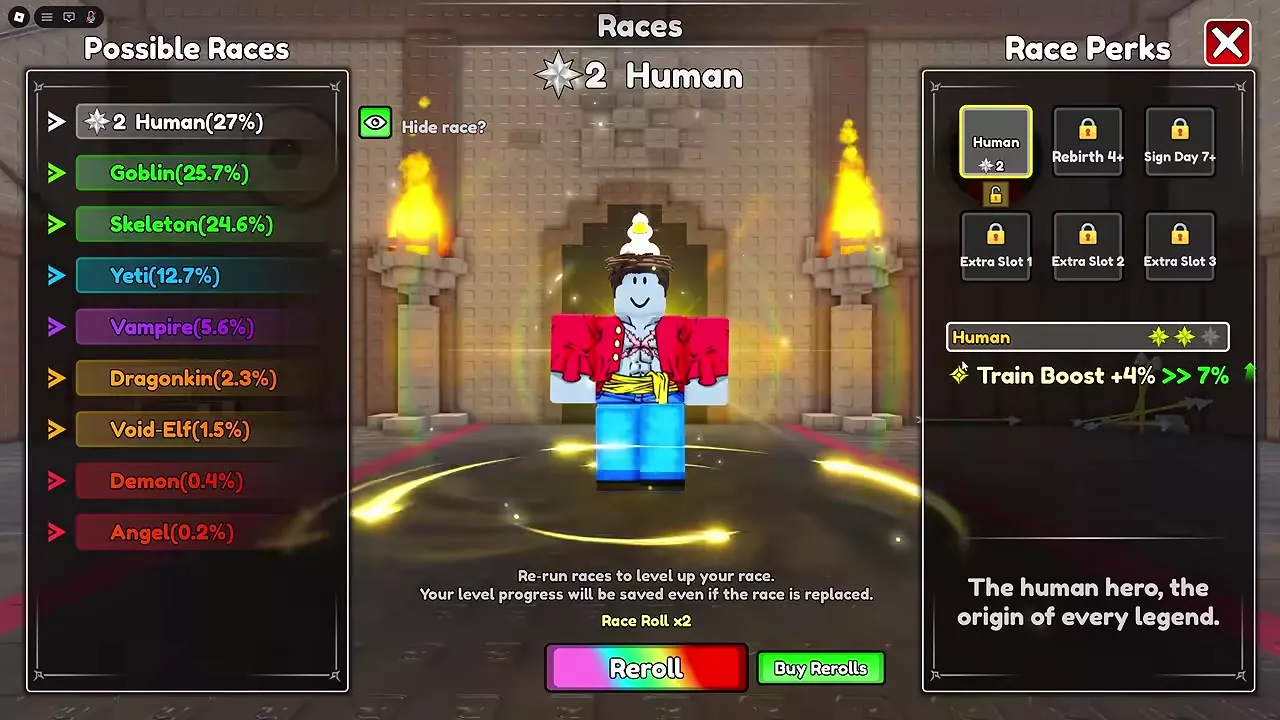
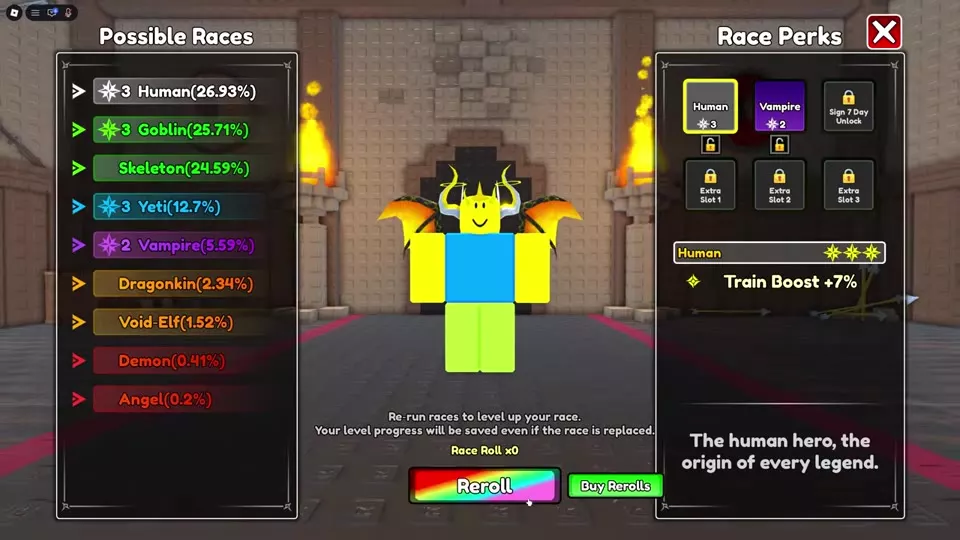
Drawing the same race again can raise that race’s star level while a higher star level is available. Its upgrade progress remains even when a different race replaces it in a slot, so a later draw or a retained slot can bring back its upgraded perks.
Select a race in Race Perks to inspect its stars. In current-to-next-star previews, the value on the left is active at the current star level; the value on the right previews the next star. On Angel’s panel marked 1, do not assume which star levels the values on either side of its arrows apply to; do not count its right-hand values as active perks. For example, a two-star Human’s displayed Train Boost after the arrow does not apply until Human reaches three stars. Use the current value when deciding whether to switch.
Use and Unlock Race Perks Slots
A retained race can be selected in Race Perks without spending another Race Roll. This lets you keep a useful race available while rerolling a different slot. Locked slots have separate requirements:
| Slot label | Requirement or option |
|---|---|
| Rebirth 4 Unlock | Reach 4 Rebirths |
| Sign Day 7+ | Reach the displayed 7-day sign-in requirement |
| Extra Slot 1 | Separate purchase; one popup showed 90 Robux (do not assume this is a discounted price); another listed 99 Robux, or 80 Robux with Plus |
| Extra Slot 3 | Separate purchase; 499 Robux listed, or 400 Robux with Plus |
Extra Slot 2 also appears locked. To unlock Extra Slot 3, select its locked tile at the bottom right of Race Perks and confirm the Extra Race Slot 3 purchase. The other occupied races remain available, and the newly opened slot retains its race’s existing star progress. Some localized menus show a Rebirth 7+ label; follow the lock text on your current slot rather than treating that label as the Sign Day 7+ requirement. For the Rebirth process, see Power Training, Auto Click, and Rebirth.
Compare Races for Your Current Goal
Search for a race by name, then select candidates to compare their configured perks side by side. Keep each perk’s star condition in view: a higher-star race may serve your goal better than a lower-star race whose stronger value is only a preview. Reset clears the search and selected races.
- Training and movement: Compare Human and Goblin at the stars you actually have. Goblin adds Move Speed, while its Train Boost begins at two stars. A higher-star Human can be the better training choice when Goblin has not reached the same level.
- Combat: Skeleton pairs Crit Rate with Damage. Vampire pairs Damage with shorter skill cooldowns, so it suits more frequent skill use; combat skills explains those attacks and slots.
- Luck, defence, and mobility: Yeti pairs Luck with Defence. Void-Elf combines Luck and Move Speed with shorter skill cooldowns. Choose according to which of those perks matters for the activity you are doing.
- Mixed training and combat: One-star Demon combines Train Boost and Luck with Skill Damage, shorter Skill CD, Move Speed, and Crit Rate. It works when you alternate between training and skill combat while keeping one race equipped.
An empty perk field in the comparison is not a zero-value perk. Check that race’s in-game Race Perks panel before choosing it for an unlisted bonus.